
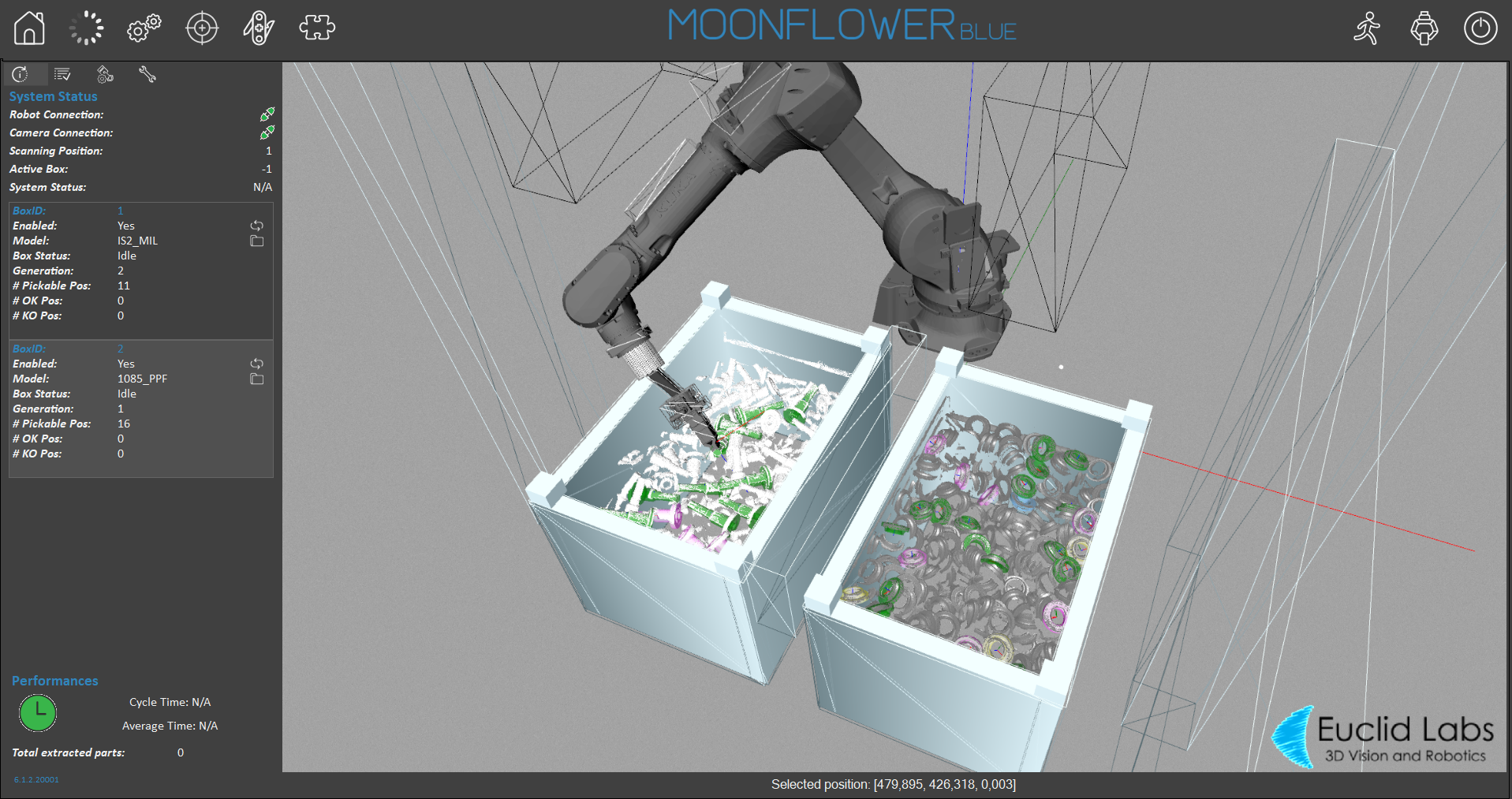
Two weeks ago we covered when robotic bin picking is the right call, and last week we covered what to look for when choosing a bin picking system. Both of those posts talk around the software without really explaining it. This week we open it up: what is bin picking software actually doing, in what order, between the moment a camera looks into a bin and the moment a robot arm closes around a part?
The short answer is that bin picking software is a pipeline, not a single feature. A 3D scan on its own is just a cloud of points. Turning that into a successful, collision-free pick takes several distinct steps happening in sequence, and understanding what each one does makes it much easier to evaluate a vendor’s claims instead of taking a demo video at face value.
What Bin Picking Software Actually Does
At a high level, bin picking software has one job: take a 3D scan of a bin full of parts in unknown positions and orientations, and turn it into a precise, safe instruction for a robot arm. That sounds simple, but a bin of parts is about as unstructured as manufacturing data gets. Parts overlap, nest inside each other, lie at odd angles, and shift every time one is removed. The software has to make sense of that chaos fast enough to keep a production cycle moving, which is why the pipeline below is built the way it is.
Step 1: Scanning the Bin
A 3D camera, mounted above the bin or on the robot’s wrist, captures a point cloud: a dense set of 3D coordinates describing the surface of everything in the bin. This is the raw material for every step that follows, and it is also where problems start if they are going to start at all. Reflective, transparent, dark, or highly textured parts scatter or absorb light in ways that make a clean scan harder to get, which is why camera placement and lighting conditions are worth testing with your own parts rather than trusting a vendor’s demo part.
Step 2: Recognition and Localization
Once the scan exists, the software has to answer two questions: which parts are present, and exactly where does each one sit in three-dimensional space, down to its precise angle. Most systems do this by matching the scan against a stored CAD model of the part, though model-free approaches that skip the CAD step are becoming more common. Feedall’s Moonflower bin picking software, distributed in North America through Feedall, uses fast matching algorithms that support both CAD-based and model-free localization, which matters if you are working with parts that do not have a finished CAD file ready to go.
Step 3: Grasp Planning
With a part identified and located, the software has to decide where on that part the gripper should actually make contact, and which part in the bin to pick first. Stacked and overlapping parts complicate this considerably: the topmost, most accessible part is not always the one with the cleanest available grasp point. Good grasp planning accounts for how parts are resting against each other, not just where a single isolated part’s geometry would suggest the ideal grip.
Step 4: Collision-Free Path Planning
Identifying a grasp point is not the same as safely reaching it. The software has to generate a full trajectory, from the gripper’s current position down into the bin, around the bin walls and neighboring parts, to the grasp point, and back out, checking that path for collisions the entire way. This is the step that keeps a bin picking cell from clipping the bin edge or knocking neighboring parts out of position mid-reach. Moonflower, for example, checks the planned trajectory against the robot and surrounding environment before it ever reaches the robot controller, and the better systems plan the next pick’s path while the current pick is still executing, which is a meaningful part of what keeps cycle times reasonable.
Step 5: Calibration
None of the steps above mean anything if the software’s coordinate system does not line up with the robot’s. Calibration synchronizes the camera and the robot to a shared reference frame, usually with a simple reference object such as a calibration sphere, so that a location identified in the scan translates to an exact, repeatable robot position. Calibration drift, caused by a bumped camera mount or a shifted bin position, is one of the more common reasons a bin picking cell that worked fine in testing starts mispicking on the production floor, which is worth asking any vendor how they detect and correct for.
Step 6: Execution, and Doing It Again
The robot executes the planned pick, and the moment it is clear of the bin, the software scans again and starts planning the next one. In a well-built system, path planning for the next pick overlaps with execution of the current one instead of waiting for it to finish, which is one of the bigger levers on overall cycle time. As the bin empties, the remaining parts shift and resettle, so this scan-plan-execute loop repeats for every single part rather than running once against a static snapshot.
The Pipeline at a Glance
The table below lays out each stage in the order it happens, what it is responsible for, and why it is worth asking a vendor about specifically.
| Pipeline Stage | What It Does | Why It Matters |
| 3D scanning | A structured-light, time-of-flight, or stereo camera captures a 3D point cloud of the parts sitting in the bin, right down to depth and orientation. | This is the raw data everything else depends on. Reflective, transparent, or very dark parts are the hardest to scan cleanly, which is why lighting and camera placement are worth testing with your own parts. |
| Recognition & localization | Matching software compares the scan against a CAD model (or, increasingly, a model-free approach) to identify which parts are present and exactly where each one sits in 3D space. | A bin of mixed or tangled parts only becomes usable once the software can tell one part from another and pin down its precise position and angle. |
| Grasp planning | The software calculates which part to pick first and exactly where the gripper should contact it, factoring in how parts are stacked or overlapping. | Picking the wrong part first, or grasping the right part in the wrong spot, is the most common source of a dropped or mishandled piece. |
| Collision-free path planning | A trajectory is generated from the gripper’s current position to the grasp point and back out of the bin, checking the whole path against the robot, the bin walls, and neighboring parts. | Without this step the arm can clip the bin or another part mid-reach, which stalls the cell and risks damage to the robot or the parts. |
| Calibration | The camera and robot are synchronized to a shared coordinate frame, typically using a simple reference object, so a location in the scan maps to an exact robot position. | Calibration drift is one of the most common causes of a bin picking cell that worked in testing but mispicks on the floor. |
| Execution & re-plan | The robot executes the pick while the software is already scanning and planning the next one, and re-scans the bin as it empties out. | Planning the next pick while the current one executes is what keeps cycle times in a usable range instead of stacking every step in sequence. |
Why This Matters When You Are Comparing Vendors
Every vendor’s marketing page will claim fast, accurate, reliable bin picking. Understanding the pipeline gives you a way to ask sharper questions: how does their recognition step handle parts without a finished CAD model, how does their path planner behave in a cluttered bin rather than an empty one, and how is calibration drift detected and corrected once the cell is running in production. Those questions line up directly with the criteria in last week’s post on what to look for when choosing a bin picking system, and according to industry adoption data from Automate.org, the gap between a vendor’s advertised performance and its real-world performance remains one of the most common reasons bin picking projects stall after a strong pilot.
When Bin Picking Software Is Not the Right Answer
Not every application needs this full pipeline. If parts can be pre-sorted, singulated, or presented in a consistent, known orientation, a flex feeder can hand a robot a part in a known position without any 3D vision at all, often at a lower cost and a faster, more predictable cycle time. Feedall has written before about where simulation and flexible feeding fit together, and the short version is that bin picking software earns its complexity when parts genuinely arrive in random orientation and a flex feeder is not a realistic way to present them.
How Feedall Approaches Bin Picking Software
Feedall is the exclusive North American distributor of Moonflower picking software, built by Euclid Labs, and pairs it with Feedall’s own Mizar 3D camera and patented Smart Bin Technology as one integrated system rather than components sourced from separate vendors. The software supports hardware-independent integration with major robot manufacturers and flexible camera placement, mounted between bin positions or directly on the robot arm, which matters when you are fitting a cell into an existing footprint. For applications where the output of a bin pick needs to be sorted or kitted downstream, Feedall’s part kitting and sorting equipment and machine tending equipment extend the same automated-feeding philosophy past the pick itself.
The Bottom Line
Bin picking software is not one feature, it is a sequence of six distinct jobs: scanning, recognition, grasp planning, path planning, calibration, and execution, each of which has to work well on its own and hand off cleanly to the next. Knowing that sequence turns a vendor’s generic performance claims into specific, answerable questions, and it is a good foundation before you dig into the vendor-selection criteria in last week’s post.
Talk to a Feedall automation engineer about whether bin picking software, a flex feeder, or a combination of the two is the right fit for your parts.
FAQ
What is bin picking software?
Bin picking software is the program that takes a 3D scan of parts sitting in a bin and turns it into a precise, collision-free instruction for a robot: which part to pick, exactly where to grasp it, and what path to take to reach it safely.
How does bin picking software recognize parts in a jumbled bin?
Most systems match the 3D scan against a stored CAD model of the part to identify it and calculate its exact position and angle. Some newer systems use model-free approaches that can localize a part without a finished CAD file.
Does bin picking software need a 3D camera to work?
Yes. The software’s recognition and grasp-planning steps all depend on a 3D point cloud from a structured-light, time-of-flight, or stereo camera. Without 3D depth data, the software cannot determine a part’s orientation or plan a safe approach.
Can bin picking software work with any industrial robot?
Many modern bin picking software packages are built to be hardware-independent and support major robot manufacturers, but compatibility should always be confirmed for your specific robot brand and controller before committing to a system.
What causes a bin picking system to mispick after it was working fine in testing?
Calibration drift is one of the most common causes. If the camera or bin position shifts even slightly, the software’s coordinate mapping to the robot can fall out of alignment, so it is worth asking any vendor how their system detects and corrects for drift over time.
Is bin picking software always the right solution for presenting parts to a robot?
No. If parts can be pre-sorted or presented in a consistent, known orientation, a flex feeder can often do the job without 3D vision at all, typically at lower cost and with a faster, more predictable cycle time.
Continue Learning
What to Look for When Choosing a Bin Picking System — last week’s post on evaluating vendors once you understand how the software itself works.
When Should You Use Robotic Bin Picking? — the earlier post on whether bin picking is the right call for your application in the first place.
Random Bin Picking: Challenges and a Solution — a deeper look at why random bin picking remains one of the hardest unsolved problems in automation.